Atlas Alert — SMS Alerts
Program name: Atlas Alert Horse Alerts · Last updated: July 8, 2026
WHO CAN OPT IN
Only customers who have already created an Atlas Alert account, installed at least one Atlas Alert camera at their barn, and activated a subscription can enable SMS alerts. There is no public form or website that captures phone numbers. All opt-in happens inside the Atlas Alert mobile app after the customer has authenticated.
HOW A CUSTOMER OPTS IN
Enabling SMS alerts is a deliberate, per-horse action taken by the customer inside the app. The flow has two screens.
Step 1 — Emergency Contacts. The customer opens the profile of a specific horse they own or care for and taps "Emergency Contacts". On that screen the customer types the name and mobile phone number of the person who should receive alerts about that horse (primary contact, and optionally a secondary contact), and turns ON the "SMS" toggle beside each contact. The default state of the SMS toggle is OFF; the customer must explicitly turn it ON. By turning the toggle ON, the customer expressly consents to receive automated text messages from Atlas Alert at the number they provided.
Step 2 — Escalation order. Back in the horse profile the customer taps "Escalation order" to configure the sequence in which alerting channels are used if the customer does not acknowledge a push notification. In that modal the customer sees the "SMS primary", "Call primary", "SMS secondary" (and "Call secondary", "Call vet") channels and can drag them into the desired order. Channels the customer has not turned ON in Emergency Contacts remain in the "Disabled" section and are never triggered.
The consent, phone number, and toggle state are stored inside our database against the customer's account and against the specific horse. The customer can turn the SMS channel OFF at any time from the same Emergency Contacts screen. Consent is per horse — enabling SMS for one horse does not enable it for other horses on the customer's account.
OPT-IN SCREENSHOTS
The following screenshots, taken from the current production Atlas Alert app, show the two-step opt-in flow described above:
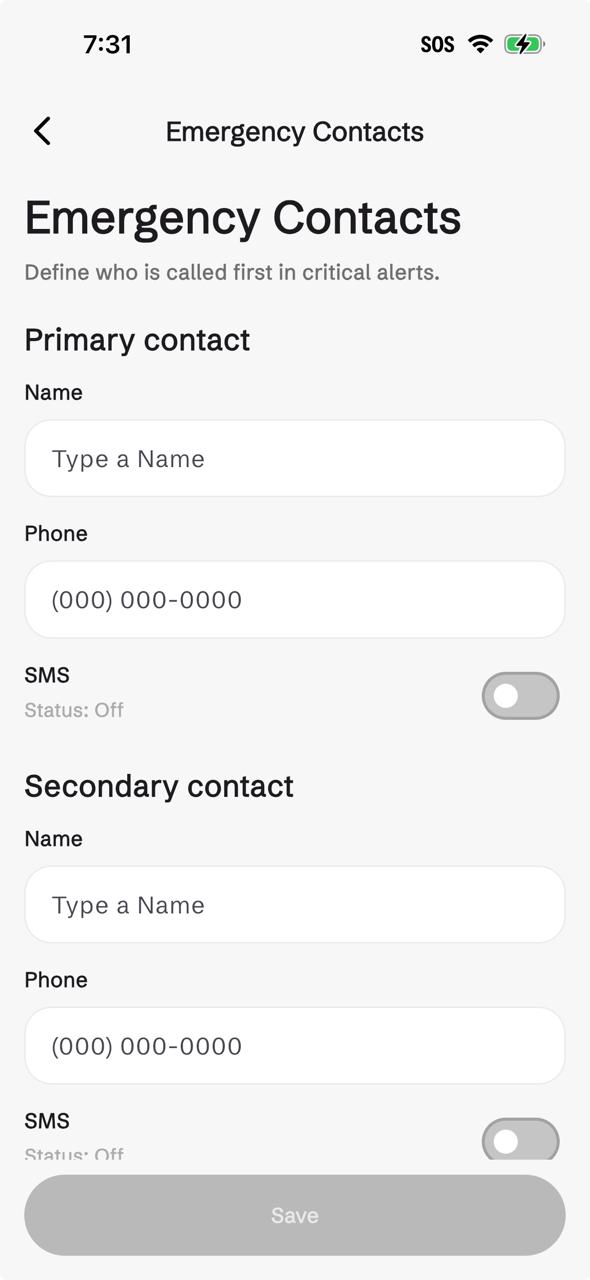
Screenshot 1 — Emergency Contacts: customer enters phone number and turns the SMS toggle ON. Default state is OFF.
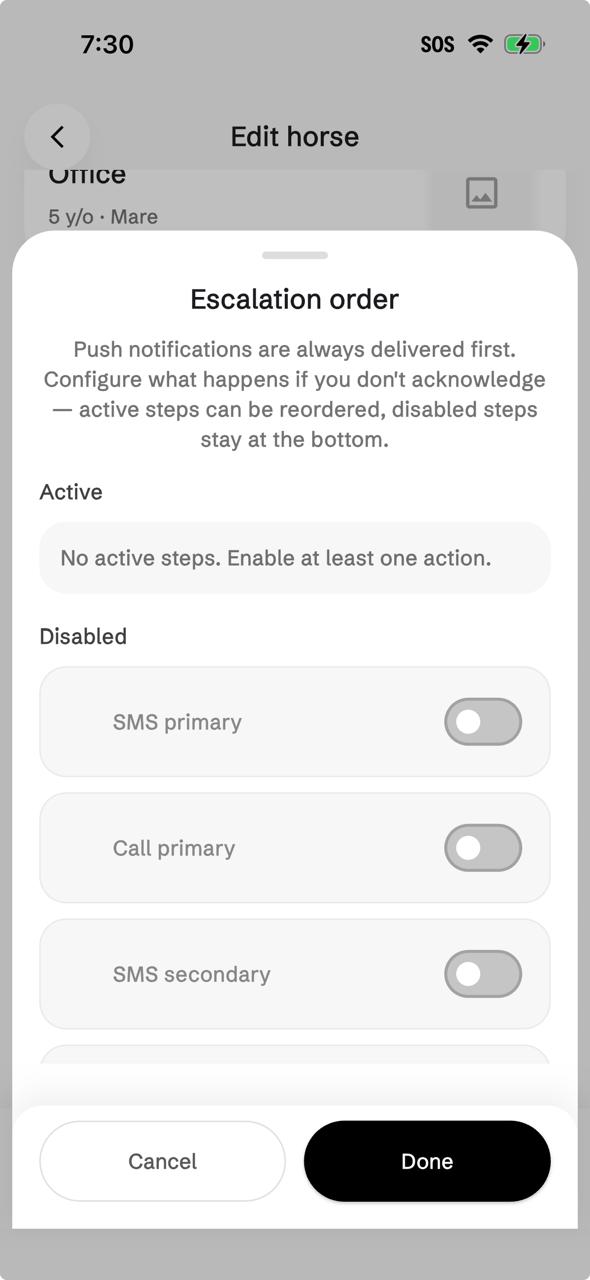
Screenshot 2 — Escalation order: customer configures the sequence in which channels fire when a push notification is not acknowledged.
WHAT MESSAGES CUSTOMERS RECEIVE
Atlas Alert only sends SMS messages when our AI detects an event our customer told us they want to be alerted about. Messages are transactional health and safety notifications. We do not send marketing, promotional, or advertising content over SMS.
Sample messages a customer may receive:
MESSAGE FREQUENCY
Message frequency varies based on activity at the customer's barn and the alert preferences the customer has configured. In normal operation a customer typically receives fewer than five (5) SMS messages per horse per month. During an active health or safety incident the customer may receive more messages until they acknowledge the alert inside the app or until the situation is resolved.
MESSAGE AND DATA RATES
Message and data rates may apply. Atlas Alert does not charge for SMS delivery, but standard rates from the customer's mobile carrier may apply to each message sent or received.
HOW TO STOP RECEIVING SMS
A customer can stop receiving SMS alerts at any time by any of the following methods:
- Reply STOP to any Atlas Alert SMS message. This opts the number out immediately.
- Open the Atlas Alert app, go to the horse profile, open "Emergency Contacts", and turn the SMS toggle OFF for that contact.
- Contact us at info@atlasalert.ai and ask us to remove the number.
After a STOP reply, no further SMS messages will be sent to that number unless the customer opts back in through the app.
HOW TO GET HELP
A customer can request help at any time by replying HELP to any Atlas Alert SMS message, or by contacting our support team at info@atlasalert.ai or by phone at +1 (888) 694-5995.
PRIVACY AND DATA HANDLING
Phone numbers collected for SMS alerts are used solely for delivering the alerts the customer has requested. Atlas Alert does not sell, rent, share, or otherwise transfer mobile phone numbers or SMS opt-in information to third parties or affiliates for their marketing purposes. Phone numbers are shared only with the messaging carriers we contract with to deliver the SMS, and only for the purpose of that delivery.
Our full Privacy Policy and Terms and Conditions describe how Atlas Alert handles data.